Your Redis Server. In Your Pocket.
Native iOS client for Redis-compatible servers.
CacheDeck is the only client designed from the ground up for iPhone, with built-in SSH tunnels, TLS/mTLS, and a safety classifier that blocks accidental writes on production. Every screen was drawn for a 6-inch display.
Free · Pro unlock $4.99 one-time · No subscription
- SSHTunnel support
- TLS& mTLS
- FreeTo start
- 0Backend servers
SSH tunnels: production-grade access
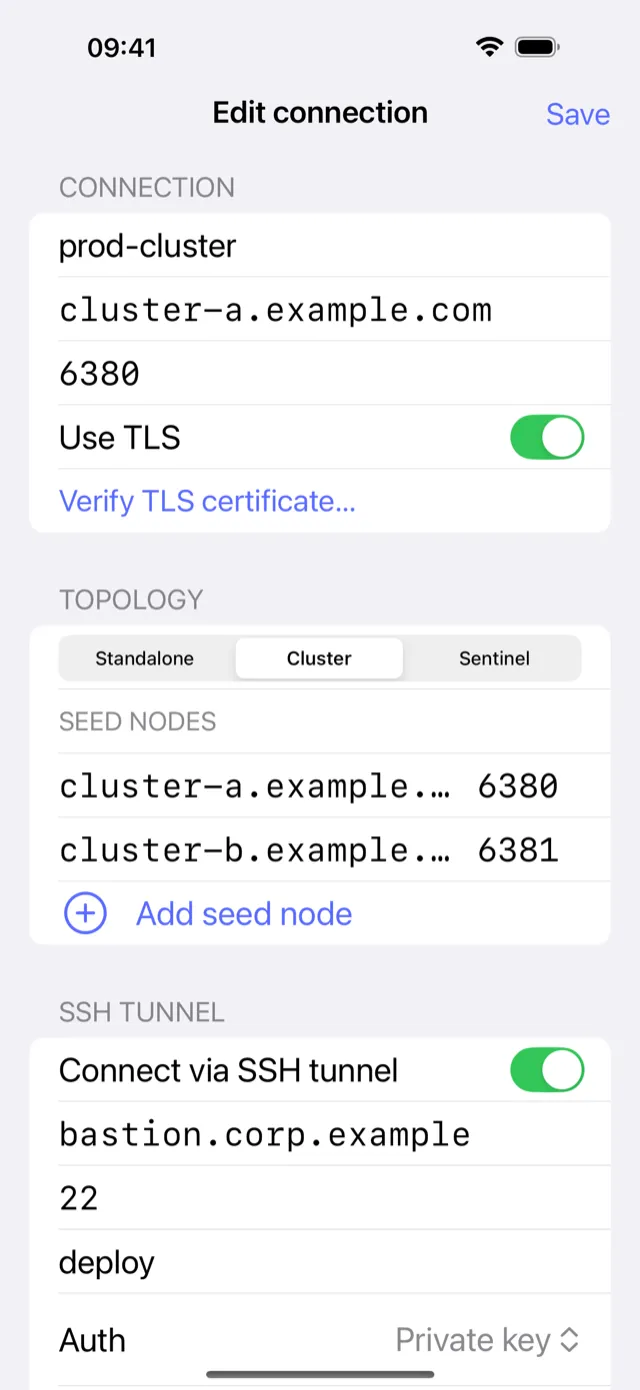
Connect to any Redis server behind a firewall. CacheDeck establishes a secure SSH tunnel directly from your iPhone. No VPN app, no extra infrastructure.
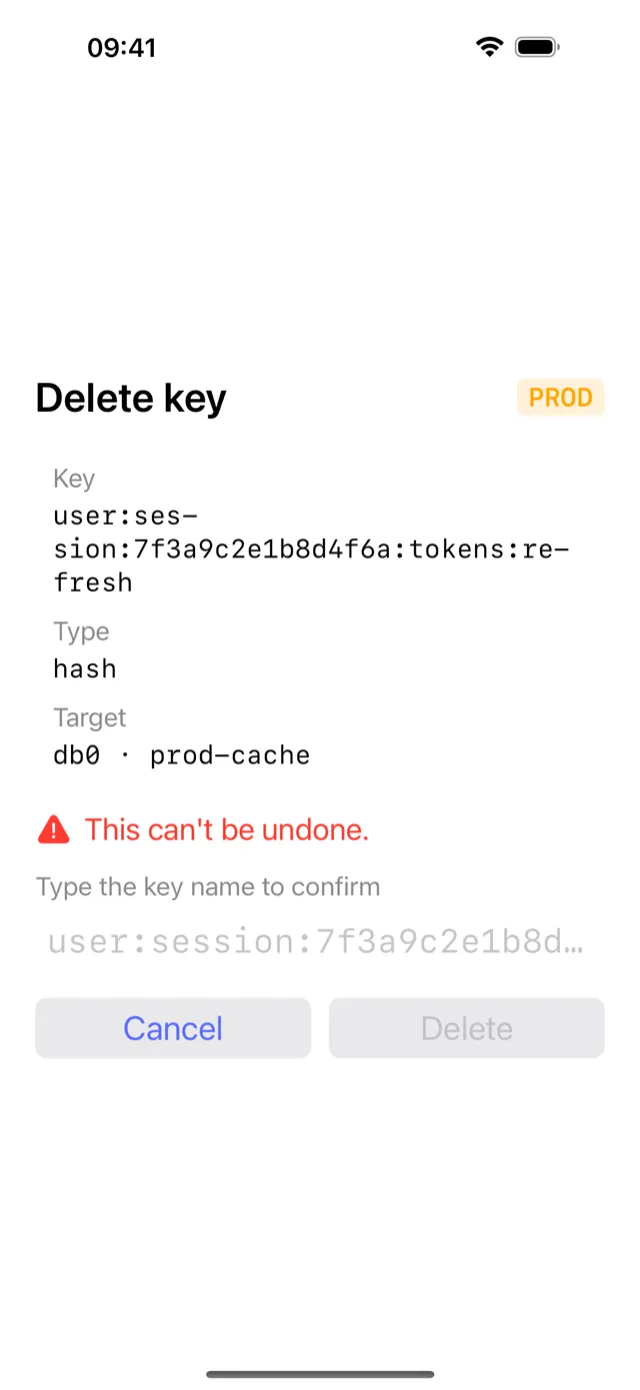
Write protection for production
CacheDeck reads hostname patterns and flags to spot production environments. Every write there waits on a confirmation step, which gives you a moment to catch a mistaken tap.
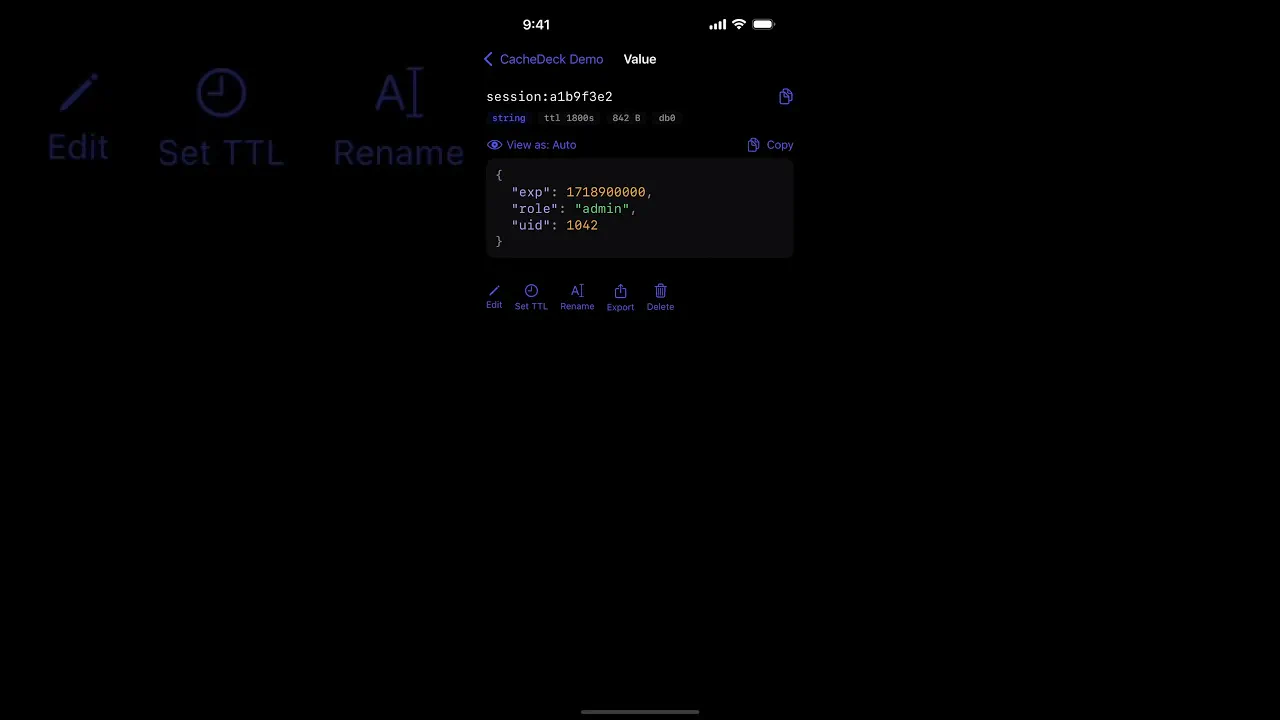
See CacheDeck in action
Twenty seconds from connecting to a server to reading a live value, recorded in the shipping app.
Everything you need to manage Redis on the go
Built for DevOps engineers, SREs, and backend developers who need real Redis access from iPhone.
Key Browser
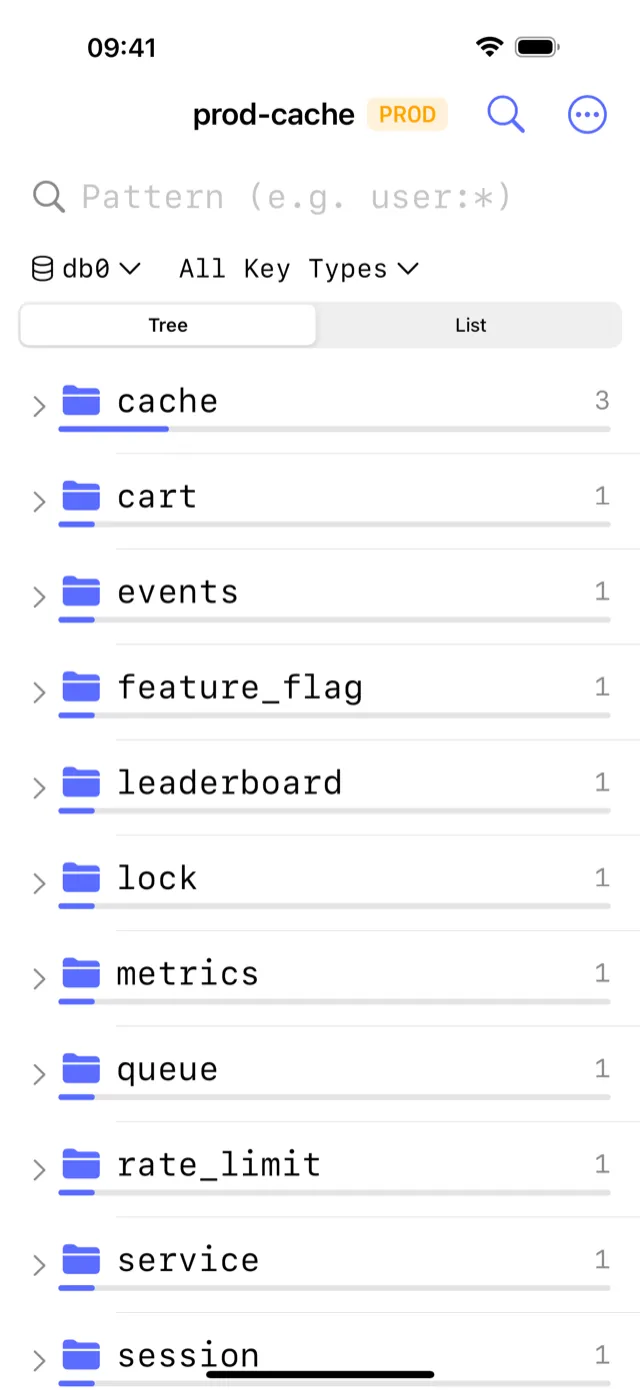
Search and navigate millions of keys with pattern matching. Inspect TTL, type, and size at a glance.
In-place Editing
Edit strings, hashes, lists, sets, and sorted sets directly. Confirm before any write on production.
Pub/Sub Monitor
Subscribe to channels and watch messages in real time. Great for debugging event-driven systems.
CLI Console
Run any Redis command from the built-in console. Command history and autocomplete included.
TLS & mTLS
Full TLS 1.3 support. Upload client certificates for mutual authentication, stored in the iOS Keychain.
Server Stats
Memory usage, hit rate, connected clients, and keyspace stats, refreshed on demand or on a timer.
See it in action
Native iOS interactions, drawn for a 6-inch display.
Browse millions of keys
Built for engineers on call
CacheDeck is the only Redis client designed from the ground up for iPhone: a visual key browser, built-in SSH tunnels, and a production safety guard that redis-cli cannot provide.
Purpose-built for iPhone, unlike redis-cli or RedisInsight
redis-cli requires a terminal emulator and a manual SSH jump host setup. RedisInsight is a desktop web UI not designed for a 6-inch screen. CacheDeck is the only Redis client with a native iOS interface built for one-tap on-call access.
SSH tunnels without a VPN app
CacheDeck opens a TCP tunnel directly from your iPhone via SSH. Ed25519 and RSA keys, stored in the Secure Enclave. No external client, no extra infrastructure.
Production writes require confirmation
CacheDeck detects PROD environments by hostname patterns and flags. A write on a production server triggers an explicit confirmation step, which stops a stray tap from reaching the server.
Credentials never leave your device
Private keys, certificates, and passwords stay in the iOS Keychain. No cloud sync, no account. Optional anonymous diagnostics are the only thing the app sends, with off switches at first launch and in Settings.
Free to try, $4.99 to own
Connect, browse the keyspace and read every value for free, with no account and no trial timer. One purchase unlocks writes, the command runner and value editing. No monthly subscription, no per-connection fee.
Every key type, natively
View and edit strings, hashes, lists, sets, sorted sets, and streams inline. Pattern search across millions of keys runs on server-side SCAN cursors.
Frequently asked questions
CacheDeck is a native iPhone app for connecting to and debugging Redis-compatible servers. It provides a visual key browser, SSH tunnel support, TLS/mTLS, Pub/Sub monitoring, and a production safety guard, all in a purpose-built iOS interface. It is free to download from the Apple App Store, with a one-time $4.99 Pro unlock for write operations.
CacheDeck is the only Redis client designed from the ground up for iPhone. The alternatives (SSH + redis-cli in a terminal emulator, or RedisInsight accessed through a mobile browser) work but are not optimized for a 6-inch screen or one-tap on-call access. CacheDeck provides a native iOS interface with built-in SSH tunnels and a production safety classifier.
Yes. Valkey is a Redis-compatible open-source key-value store and CacheDeck connects to it the same way it connects to Redis. CacheDeck supports any server that speaks the RESP2/RESP3 protocol, including Valkey, KeyDB, and Redis 6+.
CacheDeck works with Redis 6+, Valkey, KeyDB, and any server that speaks the RESP2/RESP3 protocol. It does not require Redis Stack or specific modules.
CacheDeck opens a TCP tunnel via SSH directly from your iPhone. You provide a host, port, username, and either a password or an Ed25519/RSA private key. No external app or VPN client is needed.
TLS is optional but supported. You can upload a CA certificate and, for mutual TLS, a client certificate and key, all stored in the iOS Keychain.
CacheDeck scans connection names and hostnames for patterns like 'prod', 'production', or 'prd'. Connections that match are tagged PROD and require an extra confirmation tap before any write command.
CacheDeck has no backend and no account system. Connection credentials, key names, and values never leave your device. The app ships with anonymous crash reporting and usage analytics, scrubbed through a strict allow-list; the first-launch privacy screen shows both toggles, and Settings keeps them.
No. CacheDeck is free to download, and Pro is a one-time $4.99 unlock. You get all future updates included.
CacheDeck supports Redis Cluster with slot routing and a live topology view, and Redis Sentinel with automatic master failover.
Yes. CacheDeck connects to AWS ElastiCache via SSH tunnel through an EC2 bastion (ElastiCache runs inside a VPC). Azure Cache for Redis connects directly over TLS, no bastion needed for the public endpoint. Upstash connects over TLS. All three are fully supported.
Yes. KeyDB is a multithreaded, drop-in-compatible fork of Redis that speaks the same RESP2/RESP3 protocol. CacheDeck connects to KeyDB exactly like Redis: direct TCP, SSH tunnel, or TLS. KeyDB multi-master deployments are supported by connecting to each node as a separate saved connection.
CacheDeck requires iOS 17.0 or later. It is optimized for iPhone and does not support iPad or macOS.
CacheDeck is a purpose-built native app with a visual key browser, in-place editing, Pub/Sub monitor, and a safety classifier. No terminal emulator or redis-cli binary required. SSH tunnels are built in, so you connect with one tap instead of configuring port forwards manually.
Still have questions? Contact support. We respond within 24 hours.
Ready to manage Redis from your iPhone?
Free to start. One-time Pro unlock. No subscription, no cloud account.
Free · Pro unlock $4.99 one-time · No subscription