SSH Tunnel to Redis from iPhone
Connecting to Redis from an iPhone over SSH is the standard way to reach cache servers locked inside private networks and firewalls, no VPN required. CacheDeck is an iOS Redis client with SSH tunnel support built in, so you can browse keys, run commands, and monitor your Redis SSH tunnel from iPhone in seconds, without installing a separate SSH client or configuring any VPN profiles.
How SSH tunneling works in CacheDeck
SSH port forwarding creates an encrypted TCP tunnel through a jump host (bastion) to the Redis port on your internal server. CacheDeck opens this tunnel automatically when you tap Connect: the app acts as both the SSH client and the Redis client, forwarding the local connection through the encrypted channel before Redis ever sees a byte of traffic.
The tunnel lives inside CacheDeck, so there is no VPN profile to install, no system-wide proxy to configure, and no third-party SSH app to keep around. The connection is scoped to the app and torn down cleanly when you disconnect. On iOS, persistent background tunnels and VPN certificates add friction; CacheDeck opens the tunnel on demand instead.
Compatible targets: Redis 6+, Valkey, and KeyDB.
Ed25519 and RSA key authentication
CacheDeck supports both Ed25519 and RSA private keys for SSH authentication, the two most common key types used in modern DevOps and cloud infrastructure. Ed25519 is preferred: it produces shorter keys, signs faster on mobile CPUs, and holds up better than RSA-2048 against future attacks.
Private keys are stored in the iOS Keychain (Secure Enclave-backed on supported devices). They are never written to the app's document directory, never synced to iCloud Drive, and never transmitted anywhere. The key material is accessed only during handshake negotiation and remains protected by iOS biometric or passcode lock.
CacheDeck also accepts password-based SSH authentication as a fallback. Use key-based auth for any production connection.
Step-by-step: connect to Redis over SSH from iPhone
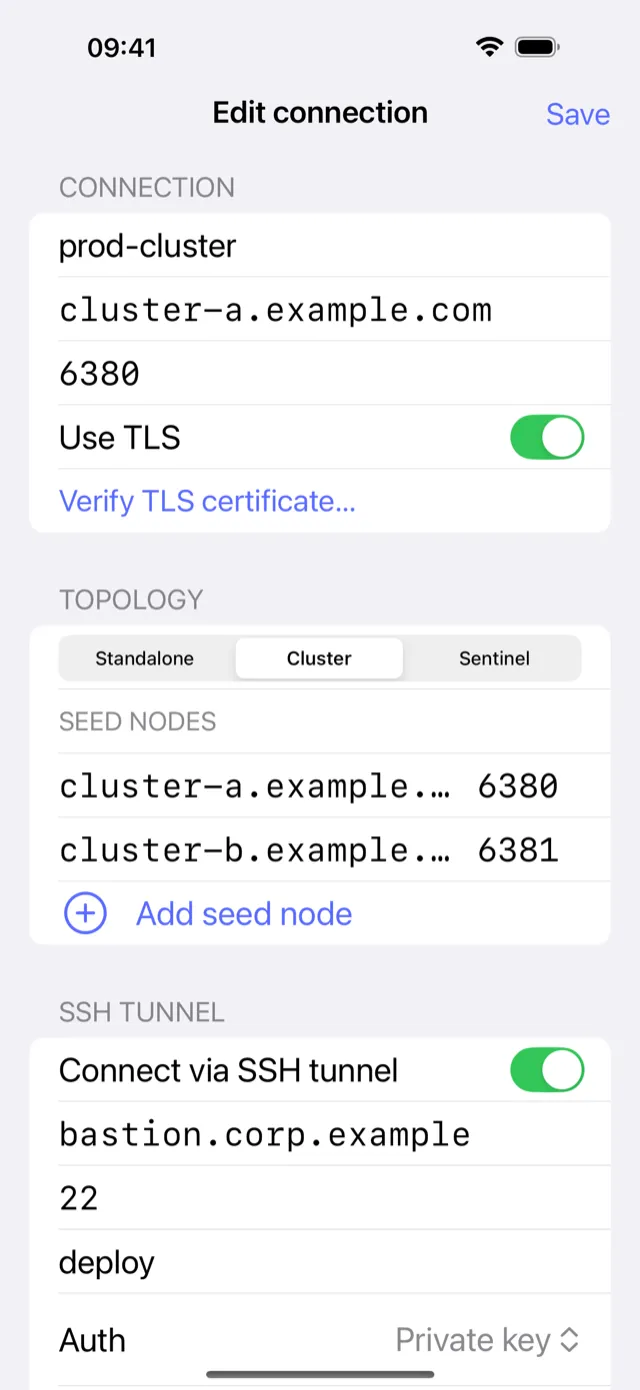
- Add your private key. Open CacheDeck → Settings → SSH Keys → Import Key. Paste or AirDrop your Ed25519 or RSA private key. The key is saved to the iOS Keychain immediately.
- Create a new connection. Tap the + button on the Connections screen. Enter your Redis server's internal hostname and port (default: 6379).
- Enable the SSH tunnel. In the connection form, toggle Use SSH Tunnel. Enter the bastion host address, SSH port (default: 22), and your SSH username. Select the key you imported in step 1.
- Connect. Tap Connect. CacheDeck negotiates the SSH handshake, establishes port forwarding to the Redis port, and opens the Redis session, all in one tap.
- Browse and inspect. Use the key browser, TTL inspector, and CLI to work with your data. The tunnel stays open for the lifetime of the session.
SSH + TLS: double-layer security
SSH tunneling and TLS encryption are independent mechanisms in CacheDeck: you can use either, or both together. If your Redis server requires TLS (or mutual TLS / mTLS with a client certificate), CacheDeck will negotiate TLS inside the SSH tunnel, giving you two layers of encryption for the data in transit.
A common pattern in hardened environments: the bastion host accepts Ed25519 SSH keys, the internal Redis port is TLS-only, and the Redis ACL requires password or certificate authentication. CacheDeck handles all three in a single connection profile (SSH tunnel, TLS handshake, Redis AUTH) without any manual port-forwarding commands or stunnel configuration.
TLS settings (CA certificate, client cert, client key, hostname verification) are configured separately from SSH settings, so you can turn them on or off independently as your infrastructure changes.
Get CacheDeck
CacheDeck is on the App Store, free with a $4.99 Pro unlock (one-time purchase, no subscription). iOS 17+. Built by Vladimir Chemeris.
Pre-sales question? Email support@cachedeck.com.
For the full technical write-up, read the blog post: How to connect to Redis over SSH from iPhone.
Redis is a registered trademark of Redis Ltd. CacheDeck is not affiliated with or endorsed by Redis Ltd. "Valkey" and "KeyDB" are trademarks of their respective owners.