Valkey Client for iPhone
CacheDeck is a native iOS app that connects to Valkey servers directly from your iPhone or iPad. Because Valkey and Redis both speak the same RESP protocol (RESP2 and RESP3), CacheDeck works with Valkey out of the box, no extra configuration needed. Browse keys, inspect values, run commands, and monitor your cache in real time, whether you're on-call or away from your desk.
What is Valkey?
Valkey is an open-source, in-memory data store and the official Linux Foundation fork of Redis, created in 2024 when Redis changed its licensing model. It is a drop-in alternative that retains full RESP protocol compatibility, so existing Redis clients (including CacheDeck) work with Valkey without modification. Valkey is developed openly at valkey.io under the BSD 3-Clause license.
Connecting CacheDeck to Valkey
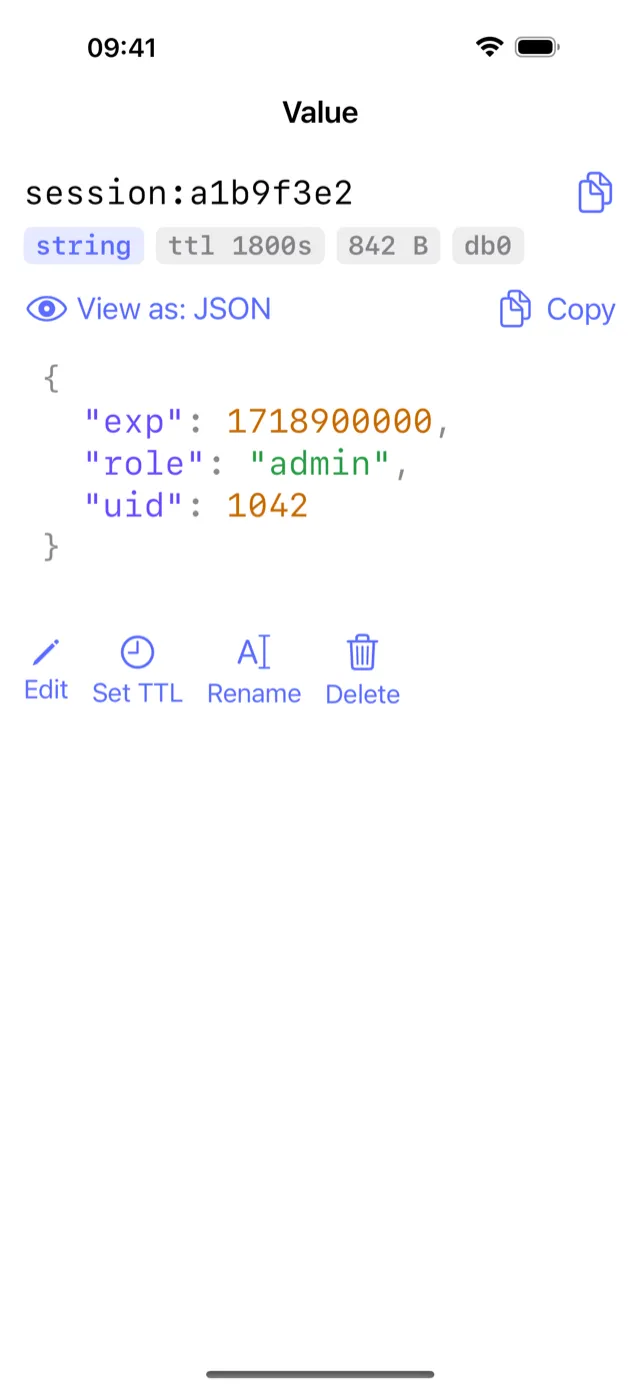
Connecting to a Valkey server is identical to connecting to Redis, because the wire protocol is the same. In CacheDeck, tap Add Server, enter your host and port (default: 6379), and optionally set an AUTH password or ACL credentials. CacheDeck will negotiate RESP2 or RESP3 automatically based on the server's capabilities. Once connected, you can browse all key types (String, List, Hash, Set, Sorted Set, Stream), view TTLs, run raw commands, and subscribe to Pub/Sub channels.
SSH Tunnel to Valkey on iPhone
Production Valkey instances typically run on private networks without public exposure. CacheDeck has SSH tunneling built in: configure a jump host, add your private key, and CacheDeck opens a secure tunnel before connecting to Valkey, no VPN app required. TLS and mTLS connections are also supported for environments where Valkey is exposed behind a TLS terminator. Your credentials are stored in the iOS Keychain, never in plain text.
Valkey, Redis, KeyDB: one app for all
CacheDeck supports any RESP-compatible server: Valkey (Linux Foundation), Redis 6+, and KeyDB. You can add multiple servers and switch between them from a single app. Whether your team runs Valkey on bare metal, Redis on ElastiCache, or KeyDB for multi-master replication, CacheDeck gives you a consistent native iOS interface for all of them. Free to download, with a one-time $4.99 Pro unlock, on iPhone running iOS 17 or later.
| Server | Protocol | SSH tunnel | TLS | Notes |
|---|---|---|---|---|
| Valkey | RESP2 / RESP3 | ✓ | ✓ | Linux Foundation fork; identical wire protocol to Redis |
| Redis 6+ | RESP2 / RESP3 | ✓ | ✓ | Redis Ltd.; ACL, AUTH, TLS in-transit supported |
| KeyDB | RESP2 / RESP3 | ✓ | ✓ | Multithreaded Redis-compatible fork by Snap; drop-in compatible |
KeyDB on iPhone with CacheDeck
KeyDB is a multithreaded, drop-in-compatible fork of Redis originally developed by Snap Inc. and now maintained as an open-source project. It speaks the same RESP2/RESP3 protocol as Redis and Valkey, so CacheDeck connects to KeyDB without any special configuration: enter the host, port, and optional AUTH password.
KeyDB is often deployed in multi-master configurations for write-heavy workloads. CacheDeck connects to individual KeyDB nodes. To inspect a specific node's keyspace during an incident, add each node as a separate connection and switch between them in the app.
Learn more: KeyDB iOS client guide
Get CacheDeck on the App Store
Free to try, $4.99 Pro unlock. No subscription. iOS 17+.
Download on the App StoreMore resources
Read the full guide on our blog: Valkey client for iOS: connecting CacheDeck to Valkey. Learn more about CacheDeck at cachedeck.com.