Two tools can get you into Redis from an iPhone. They are built for different jobs, and understanding that difference saves you setup time and on-call friction.
Blink Shell ($19.99 one-time) is one of the finest SSH terminal emulators available on any platform. It runs a full mosh/SSH client, supports Lua scripting, has a customizable keyboard row, and even bundles a local shell with a-Shell integration. For engineers who live in the terminal, it is the right tool for iPhone.
CacheDeck (free, $4.99 Pro unlock) is a native iOS client built specifically for Redis. It has a visual key browser, in-place editing, server stats, and a built-in SSH tunnel, so no terminal emulator is required.
They overlap at one point: getting Redis data out of a server while you are away from your laptop. Everywhere else they solve different problems.
What Blink Shell is
Blink Shell is an SSH and Mosh client for iPhone and iPad. It is written in Swift, open-sourced on GitHub, and has been continuously maintained since 2016. The $19.99 one-time purchase gets you:
- Full SSH and Mosh client with key and password auth
- A local shell via
a-Shell(Python, Lua, JavaScript, C compilation) - Snappy custom keyboard row for Ctrl, Esc, and common symbols
- Multiple tabs and split-screen support
- Themes, fonts, and granular terminal configuration
Blink Shell is excellent software. If you need to SSH into anything from an iPhone, not just Redis, it is the tool to reach for.
Using Blink Shell + redis-cli for Redis
The workflow is straightforward. From a Blink Shell tab:
ssh user@bastion.example.com
redis-cli -h redis.internal -p 6379
If Redis requires authentication:
redis-cli -h redis.internal -p 6379 -a yourpasswordFor TLS:
redis-cli -h redis.internal -p 6379 --tls --cacert /path/to/ca.crtOnce connected, you have the full redis-cli interface: GET, SET, SCAN, MONITOR, Pub/Sub, XREAD, Lua scripting via EVAL, and every debug command Redis exposes. No GUI wraps these. The raw command interface is available immediately.
This workflow is fast to set up if you already have Blink Shell configured with your SSH keys. It requires zero additional software beyond what a terminal-comfortable DevOps engineer already uses.
Where the terminal workflow creates friction
Blink Shell + redis-cli is capable. It is also optimized for a workstation-like interaction model that does not translate perfectly to mobile on-call use. Four friction points stand out:
Two hops, every time. You connect to the bastion, then run redis-cli pointed at the private Redis host. There is no persistent “connection” to save. Each incident starts with the same two steps: SSH to the jump host, then form the redis-cli command with the right hostname and port from memory.
No visual key browser. Navigating a keyspace with SCAN 0 MATCH "user:*" COUNT 100 in a terminal works, but on a phone it is slow. You have a small scroll area, no pattern highlighting, and no way to page through results with a swipe. Finding a specific key in a large keyspace under pressure is more error-prone than clicking through a filtered list.
No production write guard. FLUSHDB in redis-cli has no confirmation dialog. Neither does DEL. On a laptop you can catch a mistype before pressing Enter. On a phone touch keyboard, under pressure, at odd hours, the risk of an accidental destructive command is higher. Blink Shell cannot add a safeguard here: that would require modifying redis-cli itself.
The phone sleeps. iOS suspends background apps. If your screen locks during an incident (because you switched to Slack or PagerDuty), Blink Shell’s SSH session drops. You reconnect, re-authenticate, and re-run your commands. On a laptop this does not happen. On an iPhone, it happens most incidents.
These are constraints of the terminal-on-mobile model rather than flaws in Blink Shell. The app is built for active terminal sessions, and it serves them well.
CacheDeck: the native-client alternative
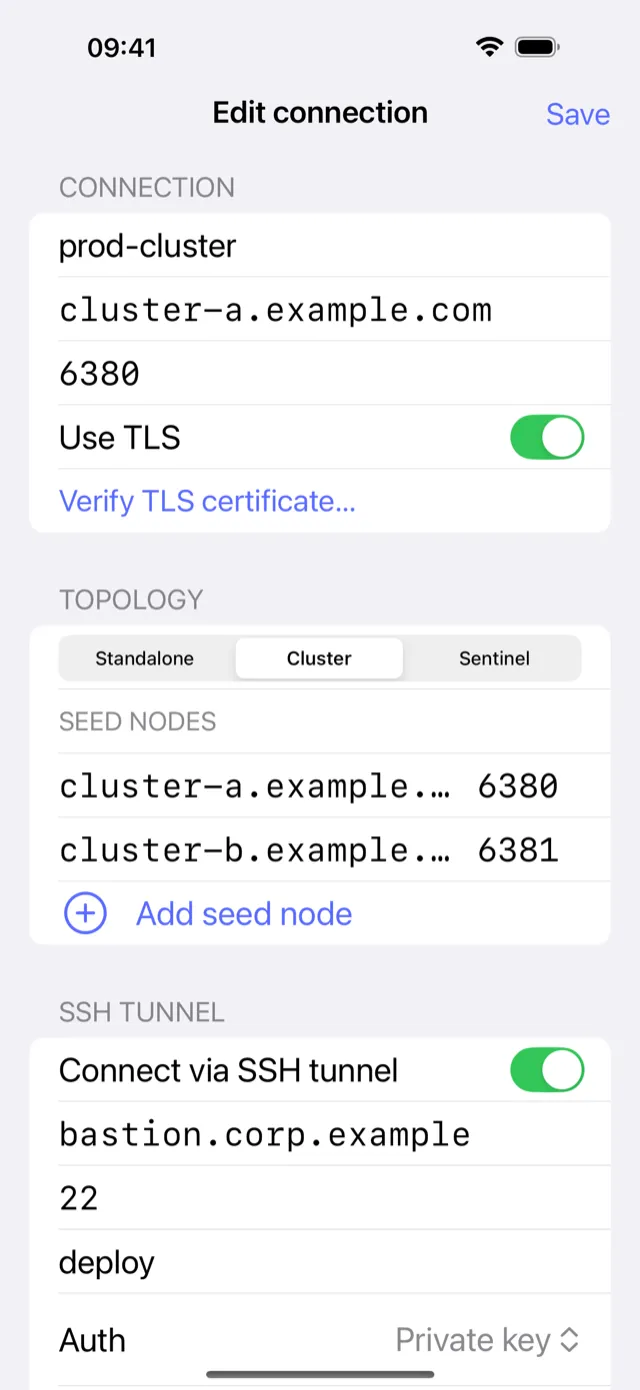
CacheDeck stores the entire connection (Redis host, SSH jump host, and private key) as a named entry. Once configured, connecting is one tap. The SSH tunnel negotiation, port-forwarding setup, and Redis handshake happen in the background; you land directly in the key browser.
The key browser uses server-side SCAN cursors, so it handles keyspaces with millions of keys without loading everything into memory. You can filter by pattern, type (string, hash, list, set, sorted set, stream), and TTL range. Tapping a key shows the value with in-place editing.
For production connections, CacheDeck applies a PROD classifier: it tags any connection whose name or hostname matches prod, production, or prd, then asks for a second confirmation tap on every write command (SET, DEL, EXPIRE, FLUSHDB). Read commands proceed without friction.
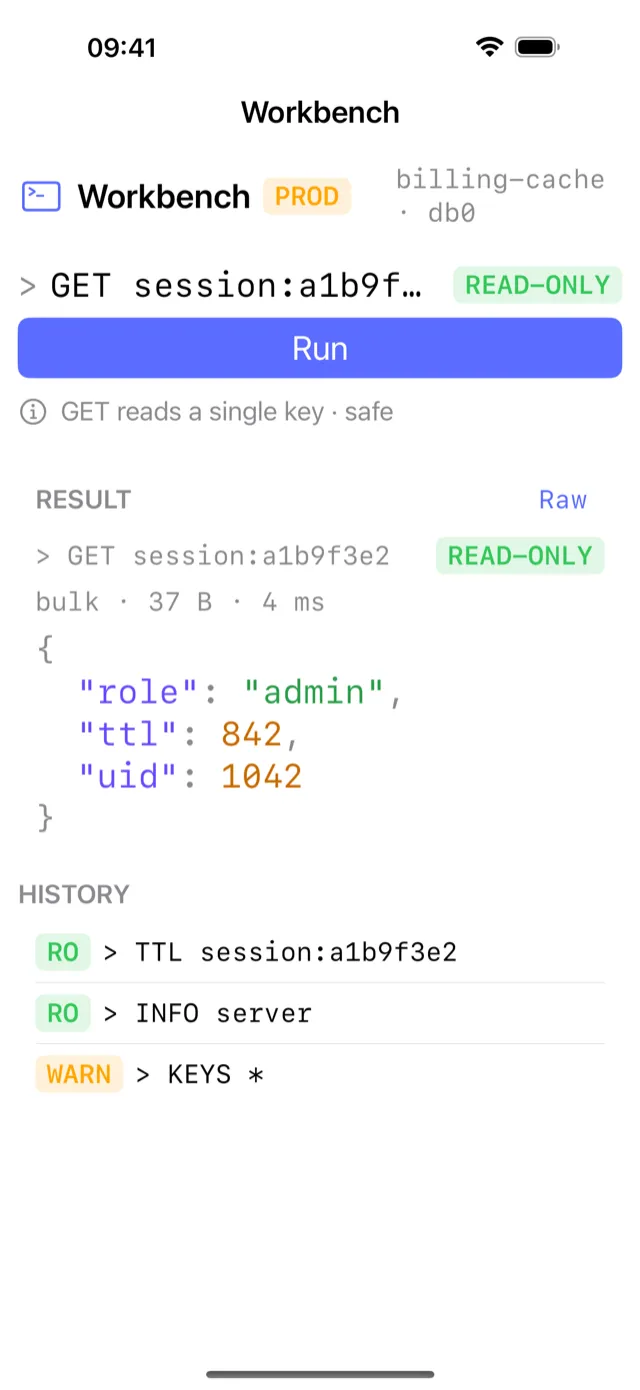
There is also a built-in CLI console inside CacheDeck. It is not a full terminal; it sends commands to the connected Redis server and displays results. For most on-call use cases (checking a specific key, running INFO, scanning with a pattern), it covers the same ground as redis-cli without requiring a separate SSH session.
What CacheDeck does not cover: Lua scripting via EVAL, the full DEBUG object interface, and LATENCY history. If you need those from mobile, Blink Shell is the right tool.
Feature comparison
| Capability | Blink Shell + redis-cli | CacheDeck |
|---|---|---|
| SSH client | Full (Mosh + SSH) | Built-in (SSH tunnel only) |
| Saved connections | No (configure each session) | Yes (named, one-tap) |
| Visual key browser | No | Yes (SCAN-cursor, filterable) |
| CLI console | Full redis-cli | Built-in (common commands) |
| Lua scripting / EVAL | Yes | No |
| Production write guard | No | Yes (PROD classifier) |
| Session survives phone sleep | No (SSH drops) | Yes (reconnects on resume) |
| Private key storage | App-level (Blink keychain) | iOS Keychain / Secure Enclave |
| TLS / mTLS | Yes (redis-cli flags) | Yes (stored in iOS Keychain) |
| Redis Cluster support | Yes | ✅ (topology view + slot routing) |
| Pub/Sub monitor | Yes | Yes |
| Server stats dashboard | No | Yes |
| Price | $19.99 one-time | Free, $4.99 Pro unlock |
Which one should you use?
Use Blink Shell when you need raw redis-cli access: Lua scripting, DEBUG commands, LATENCY history, or any command that does not have a GUI equivalent. Also use Blink Shell when you are already SSH-ing into the bastion for other reasons (checking logs, running scripts) and adding redis-cli to the same session is the path of least resistance.
Use CacheDeck when your primary goal is key inspection or value editing during an on-call incident. One tap to open a saved connection, a swipeable key browser, and a write guard for production make the on-call workflow faster and safer.
Use both. Many engineers run Blink Shell daily for general SSH work and keep CacheDeck for the specific case of Redis inspection from the phone. Blink Shell covers the terminal; CacheDeck covers the keyspace. Keeping both on the home screen costs one icon.
Redis is a registered trademark of Redis Ltd. Blink Shell is developed by Blink Shell, Inc. CacheDeck is not affiliated with or endorsed by Redis Ltd. or Blink Shell, Inc.
Related: