Native iOS Client for Redis-Compatible Servers
CacheDeck is the only client for Redis-compatible servers designed from the ground up for iPhone, a native iOS app for DevOps engineers, SREs, and backend developers who need to inspect and manage those servers from their phone.
Redis is an open-source, in-memory key-value data store commonly used as a cache, message broker, and session store. A Redis client is any application that connects to a Redis server using the RESP protocol to send commands and receive responses. CacheDeck is a native iPhone app that gives engineers a visual key browser, built-in SSH tunnels, and a production safety guard for on-call incident response. Unlike redis-cli, which requires a terminal emulator and a manual SSH jump, or RedisInsight, a desktop web UI not designed for a 6-inch screen, CacheDeck opens in one tap with your saved credentials.
Browse the key space, run raw CLI commands, watch Pub/Sub channels in real time, and connect securely through SSH tunnels or mutual TLS, all without touching a laptop. CacheDeck requires iOS 17 or later and supports any RESP2 or RESP3 server, including Redis 6+, Valkey, and KeyDB.
Key features
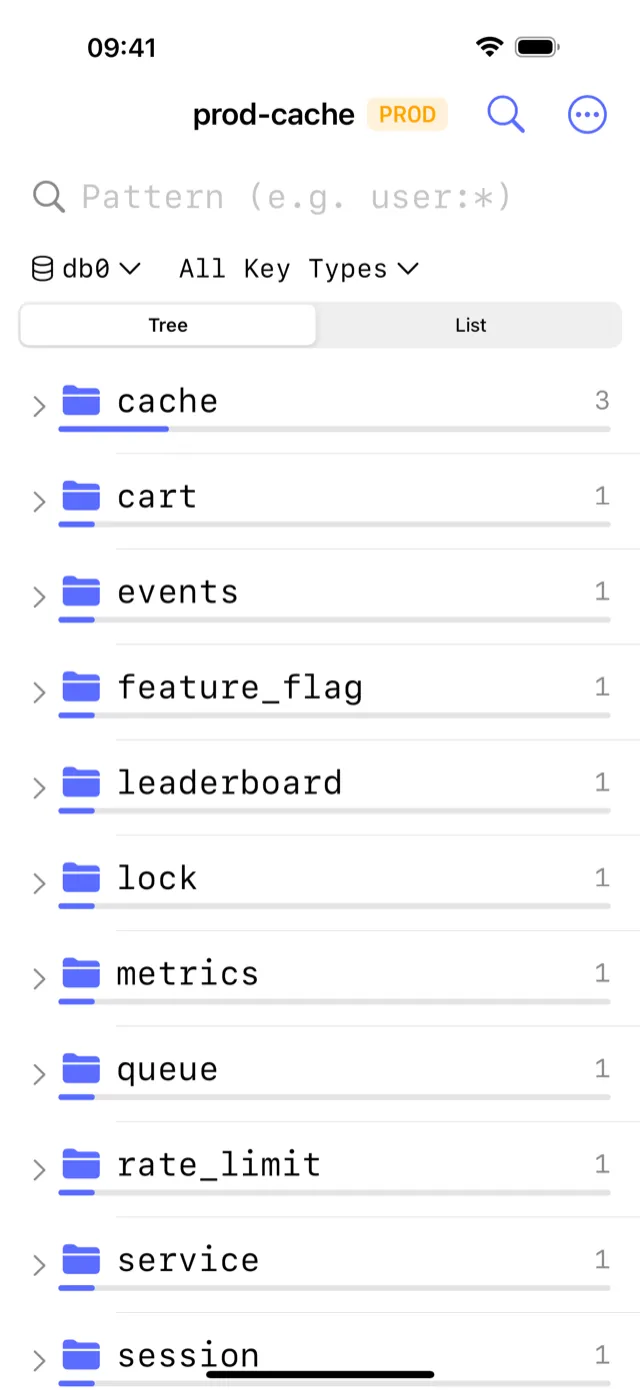
- ⌗Key Browser: Navigate the full key space with pattern search, TTL display, and value inspection for all Redis data types (String, Hash, List, Set, ZSet, Stream).
- 🔐SSH Tunnels: Connect to servers behind a bastion host using Ed25519 or RSA keys. Private keys are stored in the iOS Secure Enclave, never leaving your device.
- 🔒TLS and mTLS: Full transport encryption including mutual TLS for client-certificate authentication. Certificates are managed securely through the iOS Keychain.
- 📡Pub/Sub Monitor: Subscribe to channels and patterns in real time. Watch messages arrive as you publish from another client or from within the app's CLI Console.
- >_CLI Console: Send any Redis command directly and see the raw response. Useful for SCAN, DEBUG, CONFIG GET, XINFO, and any other command not surfaced in the GUI.
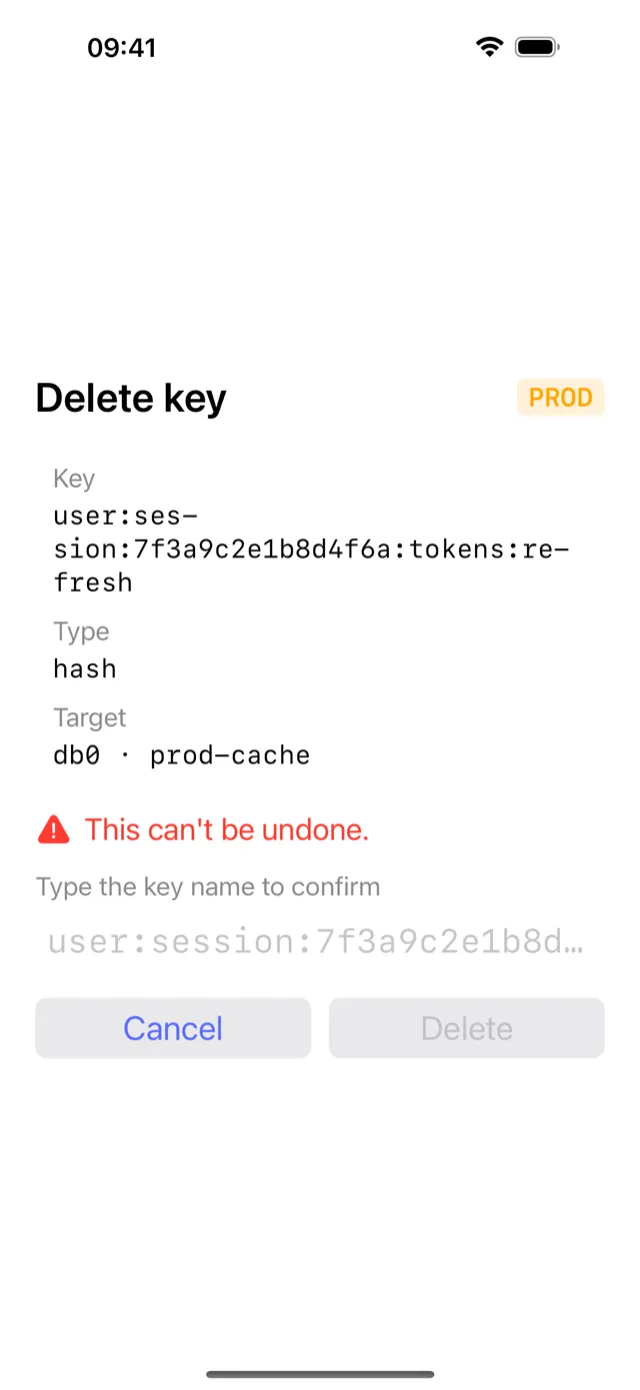
- 🛡Write Protection: Tag a connection as PROD to enable a safety classifier that prompts before any destructive write, helping you avoid accidental data loss on production servers.
How it connects to your Redis server
Most production Redis servers sit off the public internet, so CacheDeck ships two secure tunneling options alongside direct connections.
SSH Tunnel: CacheDeck opens an SSH tunnel to your bastion host and forwards the Redis port through it. Authentication uses Ed25519 or RSA key pairs. Your private key is generated on-device and stored in the iOS Secure Enclave. It cannot be exported or accessed by any other app. Hardware security keys use the same model; CacheDeck applies it in software on your iPhone.
TLS / mTLS: For services that accept direct TLS connections (such as managed Redis providers), CacheDeck validates the server certificate against your chosen CA bundle. Mutual TLS is also supported: upload your client certificate and private key once; they are stored in the iOS Keychain and used automatically for every subsequent connection to that server.
Direct: For local development or servers on a private network reachable over VPN, CacheDeck connects directly to the specified host and port with optional password authentication.
Supported servers
CacheDeck speaks the Redis Serialization Protocol (RESP2 and RESP3), so it works with any RESP-compatible server:
- Redis 6+: all editions, including Redis Community Edition and Redis Stack
- Valkey: the Linux Foundation fork of Redis
- KeyDB: the multithreaded Redis-compatible server by Snap
- Amazon ElastiCache: connect via SSH tunnel through your EC2 bastion
- Azure Cache for Redis: direct TLS connection, no bastion needed for public endpoint
- Upstash: serverless Redis over TLS
If your server accepts RESP2 or RESP3 connections, CacheDeck works with it, whatever the cloud provider or distribution.
Explore specific use cases: Visual GUI for browsing and editing keys ·Real-time server monitoring and Pub/Sub ·SSH tunnel access without a VPN
Pricing
CacheDeck is free to download, with a one-time $4.99 Pro unlock, no subscription, no per-seat fees, no feature paywalls. Pay once and you own the app forever, including all future updates during the app's lifetime on the App Store.
What is included in the purchase:
- Unlimited server connections
- SSH tunnel support with Secure Enclave key storage
- TLS and mTLS with iOS Keychain integration
- Pub/Sub Monitor, CLI Console, Server Stats
- Write Protection (PROD classifier)
- All future feature updates
CacheDeck is on the App Store
Free to try, $4.99 Pro unlock. No subscription. iOS 17+.
Download on the App StoreQuestions? Email support@cachedeck.com.
Compare CacheDeck to other tools: CacheDeck vs all alternatives (2026) ·TablePlus vs CacheDeck ·RedisInsight vs CacheDeck ·Medis vs CacheDeck ·ARDM vs CacheDeck
Learn more: CacheDeck homepage ·Blog
Redis is a trademark of Redis Ltd. CacheDeck is not affiliated with Redis Ltd.