If you use Medis on your Mac and reach for your iPhone during an incident, you run into a hard stop: there is no Medis for iPhone, and none for iPad. Medis is a macOS-only application, and its developer has not shipped an iOS version.
For engineers who rely on Medis at their desk, that leaves the on-call hours uncovered.
What Medis is
Medis is a free, open-source Redis GUI for macOS created by Nikolaj Schumacher. It is available on the Mac App Store and has been one of the most downloaded free Redis clients on macOS for years. The appeal is straightforward: clean native macOS interface, visual key browser organized by namespace, support for all standard Redis data types, and no cost.
Medis connects to Redis servers directly. It supports AUTH passwords and TLS connections. The key browser uses the colon-delimited namespace convention to render keys as a tree, which makes navigating large keyspaces easier than a flat list. You can view, edit, and delete keys across all Redis types (String, Hash, List, Set, Sorted Set, Stream) through a GUI rather than typing commands.
The maintainers ship regular updates. For Redis work on a Mac, it is a reasonable first choice because it is free and usable.
What Medis does not support
Medis runs on macOS only. The maintainers ship no iPhone or iPad build, and they have announced no iOS version in development. The project stays focused on the Mac.
That scope is deliberate. Building a native iOS Redis client is a separate engineering effort from a macOS app: different UI paradigms, different lifecycle management, different Keychain APIs for credential storage, different networking constraints for mobile. Medis solves the macOS problem well. The iOS gap belongs to a different product.
Medis platform availability:
| Platform | Medis |
|---|---|
| macOS | Available (free, Mac App Store) |
| iPhone | Not available |
| iPad | Not available |
| Windows / Linux | Not available |
| Web browser | Not available |
The on-call iPhone scenario Medis cannot cover
A PagerDuty alert fires at 1 AM. Error rates climb, and you suspect a cache key went missing or came back corrupted. Your MacBook is in the next room. You have your iPhone in hand.
On your Mac, the workflow takes about ten seconds: open Medis, select the connection, search for the key, inspect the value. On iPhone without a purpose-built tool, your realistic options are:
- Walk to the laptop, open it, wait for macOS to wake, open Medis
- SSH into a bastion using Blink Shell or Prompt and run
redis-clicommands manually - Open a browser and try to reach a RedisInsight web instance if one is deployed and accessible
None of these match the ten-second key inspection Medis gives you on macOS, and the phone in your hand is the device you are stuck with.
CacheDeck: the native iPhone Redis client
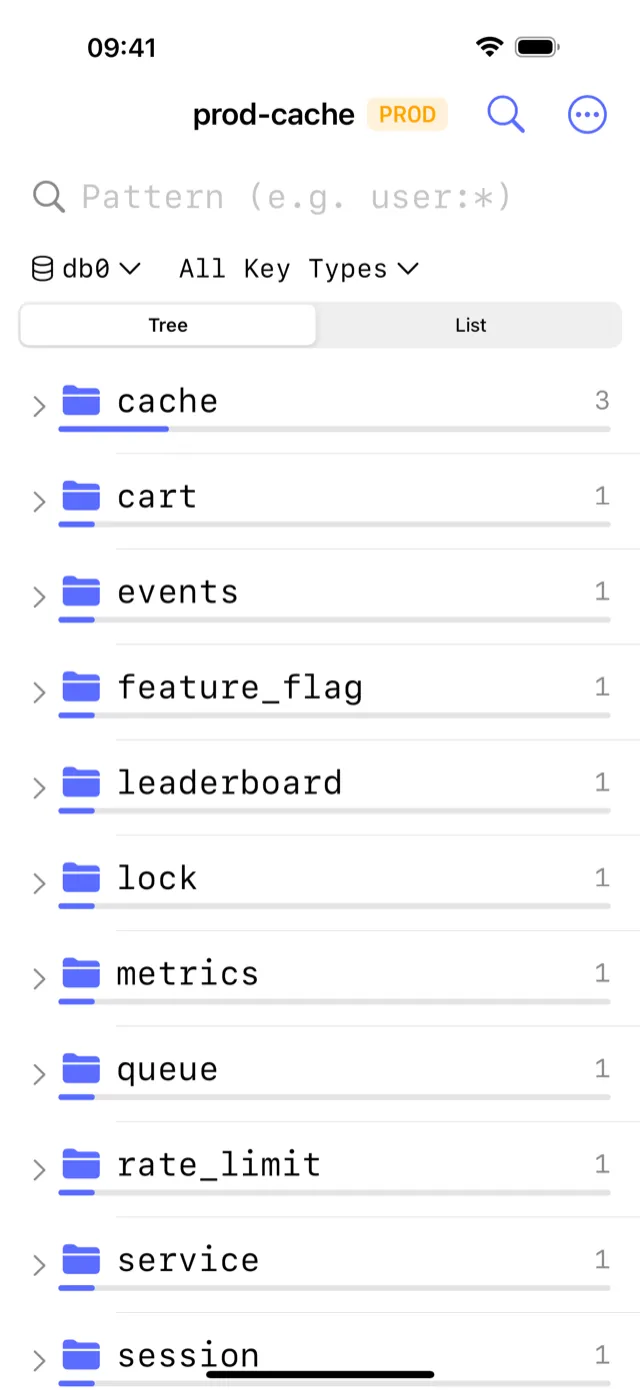
CacheDeck is a native iPhone application built for Redis access. Every screen is designed for touch-first interaction on a 6-inch display, written in Swift with no web view in the stack.
The key browser follows the same namespace-tree convention that Medis uses on macOS. Keys delimited by colons are grouped into expandable namespaces. You can filter by glob pattern, browse by type, and tap any key to see its full value, TTL, and encoding, without typing a Redis command.
What CacheDeck provides:
- Visual key browser: namespace tree, glob filter, type badges (String, Hash, List, Set, ZSet, Stream), TTL display, value viewer for each type
- SSH tunnel built in: configure your bastion host once; CacheDeck opens the tunnel automatically on each connection; private keys (Ed25519 and RSA) are stored in iOS Secure Enclave
- TLS and mTLS: connect to ElastiCache, Azure Cache for Redis, Upstash, and any TLS endpoint; client certificates stored in iOS Keychain
- CLI console: run any Redis command, see raw responses, command history persisted across sessions
- Server stats: memory usage, hit rate, connected clients, keyspace parsed from
INFO, readable on a phone screen - Production safety classifier: connections matching
prod,prd, orproductionin name or hostname are labeled PROD; all destructive writes require an extra confirmation tap
Price: Free to download. $4.99 one-time Pro unlock. No subscription. No seat fee.
Feature comparison: CacheDeck vs Medis on iPhone
| Feature | CacheDeck (iPhone) | Medis (iPhone) |
|---|---|---|
| Available on iPhone | Yes | No |
| Native app | Yes | No |
| Namespace key browser | Yes | No |
| SSH tunnel | Yes | No |
| TLS / mTLS | Yes | No |
| CLI console | Yes | No |
| Server stats (INFO) | Yes | No |
| Production safety guard | Yes | No |
| All Redis data types | Yes | No |
| Price | Free, $4.99 Pro unlock | No iPhone app |
The comparison comes out one-sided because Medis does not exist on iPhone. Medis is a different tool on a different platform. On macOS, Medis and CacheDeck both provide a visual key browser and Redis type support; the choice there comes down to preference and whether you want to pay for CacheDeck’s additional features. On iPhone, the choice is CacheDeck or a manual terminal workflow.
Connecting CacheDeck to the same Redis servers as Medis
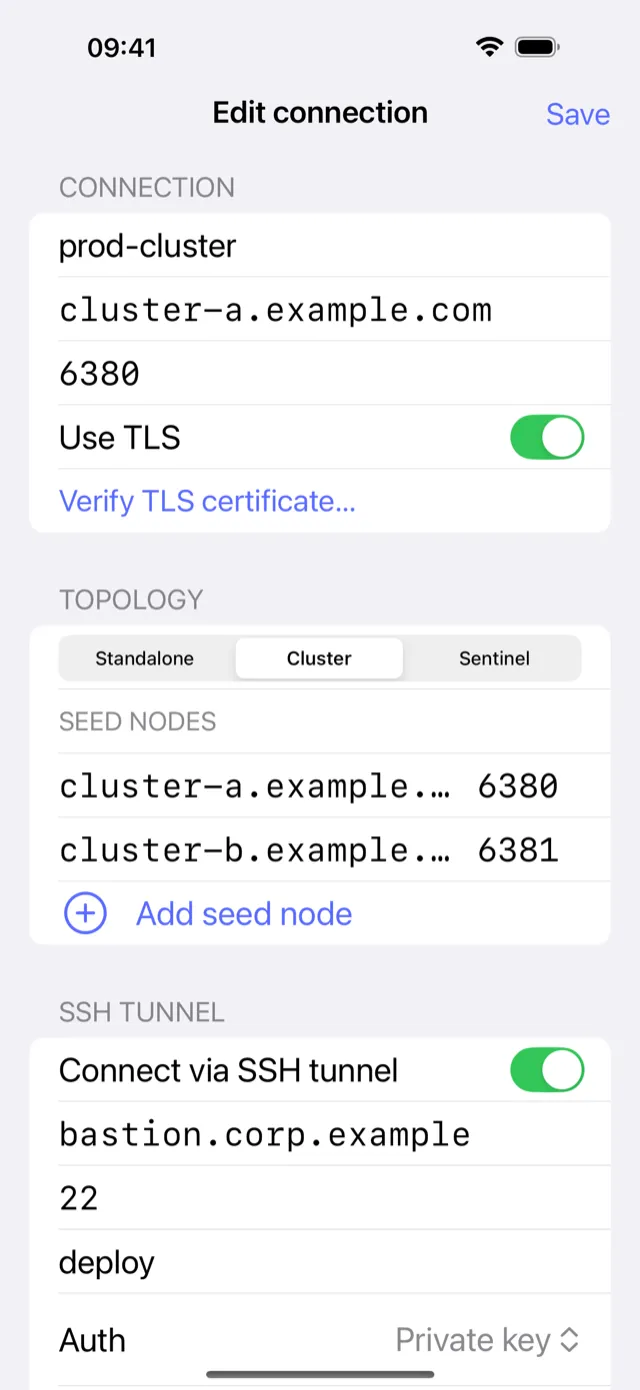
If you already have Redis connections set up in Medis on your Mac, you can replicate them in CacheDeck using the same credentials. There is no connection export from Medis to CacheDeck; you enter the details once manually.
For direct connections:
- Use the same host, port, and AUTH password from your Medis connection
For TLS connections (ElastiCache, Azure Cache, Upstash):
- Same host and port; enable TLS in CacheDeck
- For services that use public CA certificates, no custom CA import is required
For SSH tunnel connections:
- Same bastion host, SSH port, and username from your Medis config
- Import your private key into CacheDeck: Ed25519 or RSA are both supported; CacheDeck stores it in iOS Secure Enclave rather than in a file
After the initial setup, CacheDeck saves connection details in iOS Keychain. Reconnecting is one tap, with the SSH tunnel opening automatically in the background.
Where each tool fits
Medis is a well-designed, free Redis GUI for macOS. If you are working at a desk with a Mac, Medis is a solid choice, especially because it costs nothing and covers the core key-browsing workflow cleanly. If you are comparing Medis against CacheDeck on macOS specifically, the differences come down to SSH tunnel support and TLS configuration: Medis does not handle SSH tunnels for servers behind a bastion, which CacheDeck does on both macOS (via third-party tools) and iOS natively.
On iPhone, Medis is not an option at all, and CacheDeck covers that ground: inspecting or adjusting Redis state from a phone in under a minute, while your Mac sits in another room. If you use Medis at your desk and carry an iPhone on call, the two cover different hours of the same day.
Medis is an open-source project created by Nikolaj Schumacher and is available on the Mac App Store. CacheDeck is not affiliated with or endorsed by the Medis project or its author. Redis is a registered trademark of Redis Ltd. CacheDeck is not affiliated with Redis Ltd.
Related: TablePlus alternative for iPhone · RedisInsight alternative for iPhone · Redis client for iPhone: comparison · CacheDeck feature overview