If you use TablePlus on your Mac and need to access Redis from your iPhone, you hit a wall: TablePlus has no iPhone app. The iPad app exists, but it requires iOS 16+ on iPad, and even there it is a different product experience than what you get on macOS. For on-call Redis access from an iPhone, you need a different tool.
TablePlus covers macOS and iPad well. The gap sits on the phone, and engineers reach for something else at 2 AM.
What TablePlus supports on Apple devices
TablePlus is available on:
- macOS: the primary platform; full feature set
- iPad (iOS 16+): available since 2023; most macOS features ported to tablet
- iPhone: not available
The missing iPhone app reflects a deliberate product decision. TablePlus is a database management tool optimized for large screens, keyboard shortcuts, and multi-tab workflows. An iPhone screen at 390 points wide is not the right canvas for that interface.
TablePlus supports a wide range of databases beyond Redis: PostgreSQL, MySQL, SQLite, MongoDB, and others. For teams who want a single tool for all their databases on a Mac or iPad, it is an excellent choice. For on-call Redis access from an iPhone specifically, it does not exist.
TablePlus pricing (as of 2026):
- Basic: free (limited tabs, limited connections)
- Full license: $59/year subscription, or $149 perpetual license (limited future updates)
- Team plan: $99/year per seat
There is no iPhone app to purchase at any price.
The on-call iPhone scenario
The specific problem TablePlus does not solve: you receive a PagerDuty alert at 2 AM, your laptop is across the room, and you need to check whether a Redis key exists, what its TTL is, and whether its value looks correct. You have your iPhone in hand.
On macOS, you would open TablePlus, select your Redis connection, and be looking at the keyspace within seconds. On iPhone, you have no TablePlus. Your options without a purpose-built tool:
- Get up, open the laptop, and use TablePlus on macOS
- SSH into a bastion host using a terminal emulator (Blink Shell, a-Shell) and run redis-cli manually
- Use a browser on iPhone to access RedisInsight if it is deployed and reachable
None of these are one-tap solutions from a phone.
CacheDeck: the native iPhone Redis client
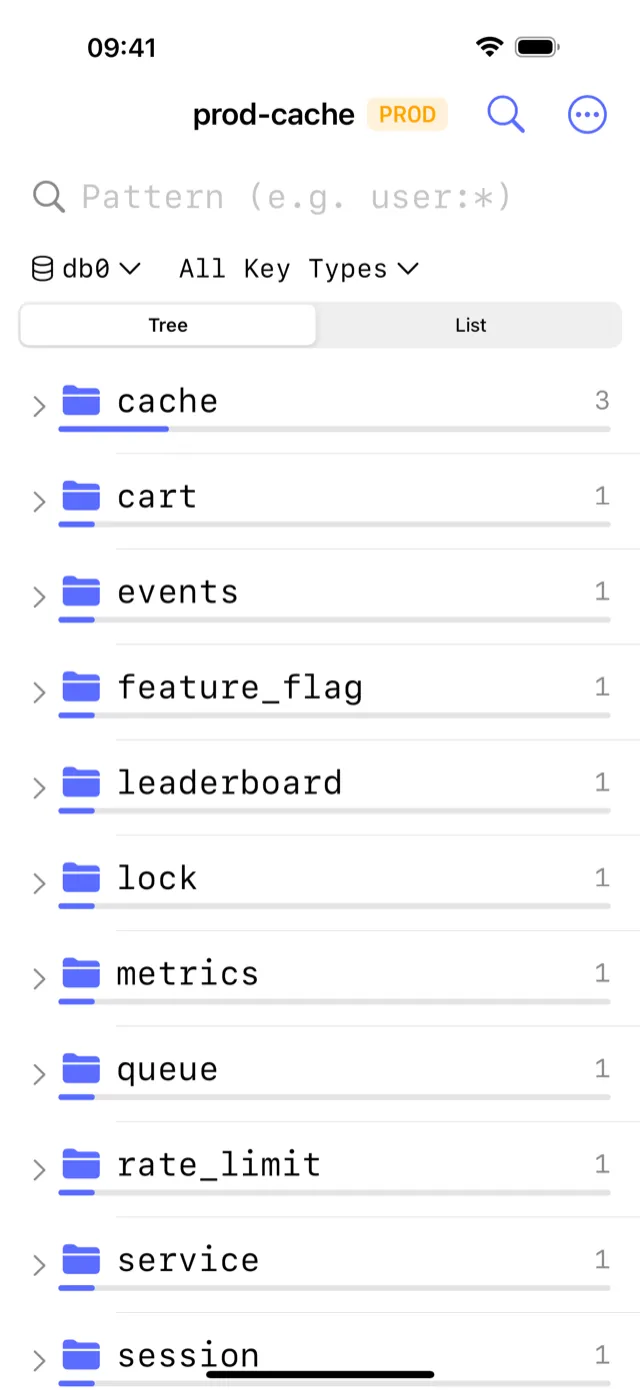
CacheDeck is a native iPhone app built specifically for Redis access. Every screen is designed for a 6-inch display with touch-first interactions, written in Swift with no browser shell in the stack.
What CacheDeck provides that fills the TablePlus iPhone gap:
- Visual key browser: navigate the keyspace as a tree, filter by glob pattern, view type / TTL / value for any key without typing a command
- SSH tunnel built in: configure your bastion once; CacheDeck opens the tunnel on every connect, with Ed25519/RSA keys stored in iOS Secure Enclave
- TLS and mTLS: connect to ElastiCache, Azure Cache, Upstash, and any TLS Redis endpoint directly; client certificates stored in iOS Keychain
- CLI console: run any Redis command and see the raw response, with command history
- Server stats: memory, hit rate, connected clients, keyspace, parsed from
INFOand readable on a phone display - Production safety classifier: connections whose name or hostname matches
prod,prd, orproductionare tagged PROD; all writes require an extra confirmation tap
Price: Free to download. $4.99 one-time Pro unlock. No subscription. No per-connection fee.
Feature comparison: CacheDeck vs TablePlus on iPhone
| Feature | CacheDeck (iPhone) | TablePlus (iPhone) |
|---|---|---|
| Available on iPhone | ✅ | ❌ Not available |
| Native app | ✅ | ❌ |
| Visual key browser | ✅ | ❌ |
| SSH tunnel built in | ✅ | ❌ |
| TLS / mTLS | ✅ | ❌ |
| Production safety guard | ✅ | ❌ |
| Redis Cluster support | ✅ | ❌ |
| Other databases (Postgres, MySQL) | ❌ Redis only | ❌ |
| Price | Free, $4.99 Pro unlock | No iPhone app |
CacheDeck vs TablePlus on iPad
If you are on an iPad rather than an iPhone, you have more options.
TablePlus on iPad supports Redis connections with the same visual interface as macOS, including SSH tunnels and TLS. If you already have a TablePlus license that includes iPad, it is a reasonable choice for tablet-based Redis access.
When to prefer CacheDeck on iPad:
- You do not already have a TablePlus license (CacheDeck is free to try, and $4.99 once against $59+/year)
- You want a Redis-specific tool rather than a general database manager
- You value the PROD write protection classifier, which TablePlus does not have
When to stick with TablePlus on iPad:
- You already have a TablePlus license and use it for PostgreSQL, MySQL, or other databases
- You want a unified interface across all your database types
- You prefer the TablePlus UX that you already know from macOS
The practical difference is small on iPad. On iPhone, there is no choice to make: TablePlus is not available.
What about using TablePlus on a Mac remotely?
Some engineers remote into their Mac using Jump Desktop, Screen Sharing, or similar tools to access TablePlus from their iPhone browser or Jump client. It functions, and it is unpleasant:
- Latency of the remote desktop connection adds to Redis round-trip time
- A 6-inch screen displaying a macOS desktop requires constant pinch-to-zoom
- Your Mac must be on, unlocked, and accessible remotely
- If your Mac falls asleep or loses its network connection, the session drops
For a quick key inspection during an incident, driving a macOS app remotely from an iPhone takes longer than the inspection itself. Treat it as a last resort.
Connecting CacheDeck to the same Redis servers as TablePlus
If you already have Redis connections configured in TablePlus on your Mac, you can replicate them in CacheDeck on your iPhone using the same credentials.
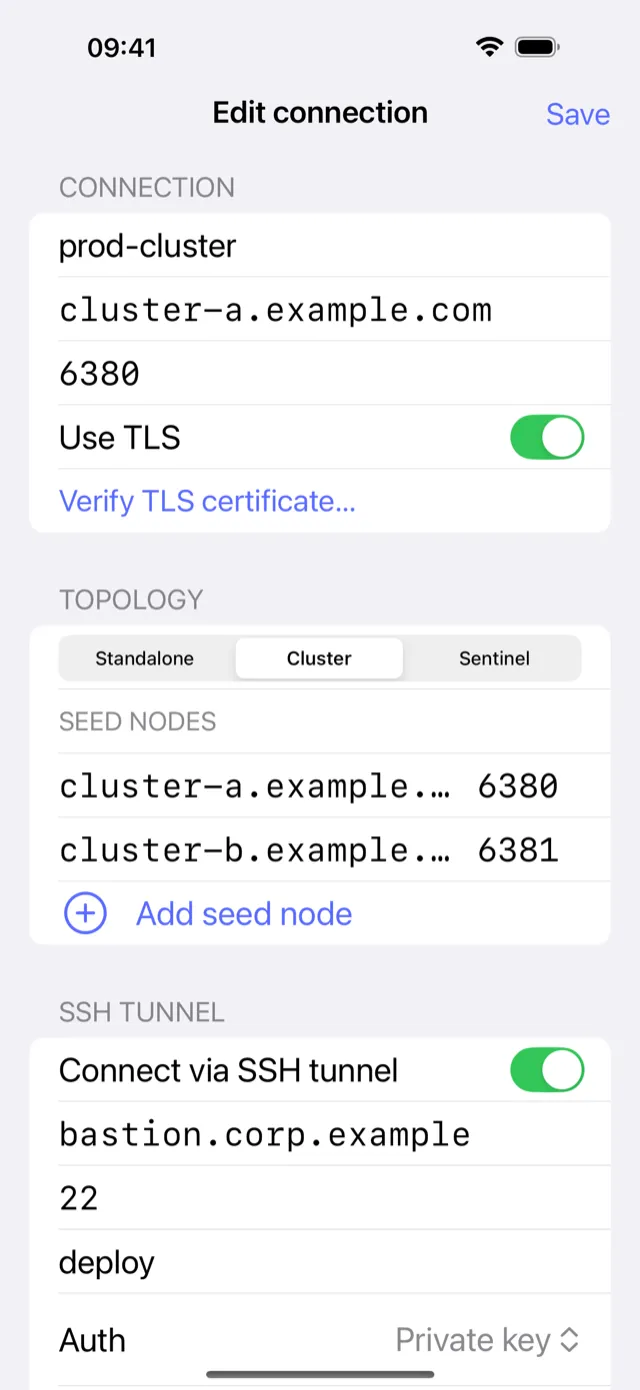
For SSH tunnel connections:
- Use the same bastion host, port, and username you have in TablePlus
- Import your private key into CacheDeck (Ed25519 or RSA). CacheDeck stores it in iOS Secure Enclave
For TLS connections (ElastiCache, Azure Cache, Upstash):
- Same host, port, and credentials as in TablePlus
- Enable TLS in CacheDeck; for public CA certificates (ElastiCache, Azure, Upstash), no custom CA import needed
For direct connections:
- Same host, port, and AUTH password
There is no connection export from TablePlus to CacheDeck; you re-enter the details once. After that, CacheDeck saves them in iOS Keychain the same way TablePlus saves them in macOS Keychain.
Where each tool fits
TablePlus is a better tool on macOS and iPad. It supports more databases, has a richer query interface, and benefits from years of desktop-first UX refinement. If you are at a desk with a Mac, use TablePlus.
CacheDeck covers the case TablePlus leaves open: Redis access from an iPhone, when the alert fires and you need to check a key before the laptop is even open. If you use TablePlus every day and carry an iPhone on call, the two cover different hours of the same day.
TablePlus is a trademark of TablePlus Inc. CacheDeck is not affiliated with or endorsed by TablePlus Inc. Redis is a registered trademark of Redis Ltd. CacheDeck is not affiliated with Redis Ltd.
Related: RedisInsight alternative for iPhone · How to SSH into Redis from iPhone · CacheDeck vs all alternatives · Redis client for iPhone: full feature overview · Medis vs CacheDeck · ARDM vs CacheDeck · Blink Shell for Redis on iPhone