If you use RedisInsight on your desktop and you need to access Redis from your iPhone, you hit the same wall: RedisInsight has no iOS app. The mobile options are narrower than the desktop ones, and for on-call engineers the right choice depends on how much setup you want to do at 2 AM.
Three RedisInsight alternatives for iPhone are worth knowing: a native iOS client, RedisInsight reached through a tunnel, and redis-cli in a terminal emulator.
What RedisInsight does and why it doesn’t run on iPhone
RedisInsight is a free graphical client for Redis, made by Redis Ltd. It runs as a local web server (port 5540) on macOS, Windows, and Linux. The interface loads in your browser, which puts it within reach of any device, but it is not designed for mobile screens, and reaching it from an iPhone requires either a VPN to your desktop or an SSH port-forward from a terminal emulator.
RedisInsight’s strengths are on the desktop: Cluster topology visualization, slow log analysis, memory profiler, and a rich command builder. On a 6-inch iPhone screen with a tunnel in the mix, you spend more time fighting those features than using them.
There is no native RedisInsight iOS app, and Redis Ltd. has not announced one.
Option 1: CacheDeck, the native iOS Redis client
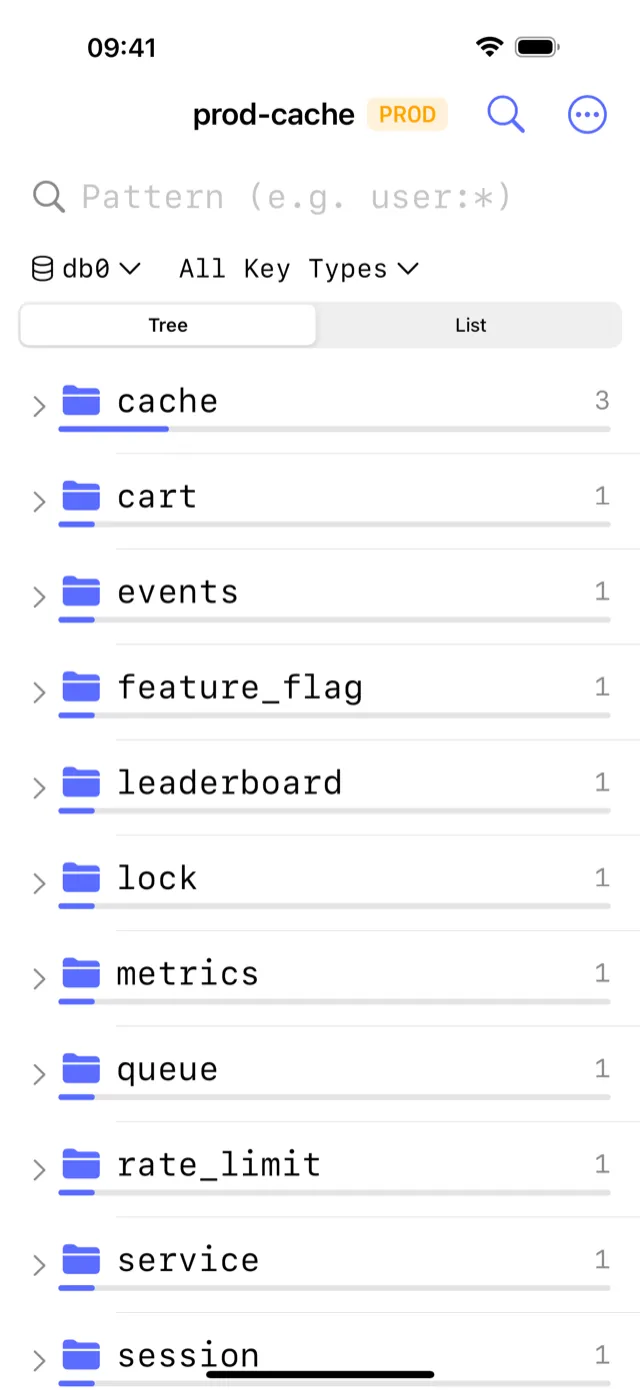
CacheDeck is the only Redis client designed from the ground up for iPhone. It connects to any Redis-compatible server (Redis 6+, Valkey, KeyDB) over a direct connection, SSH tunnel, or TLS, and provides a native iOS interface for key browsing, editing, and debugging.
What CacheDeck offers that RedisInsight does not:
- One-tap access from iPhone: no desktop machine needed, no tunnel to configure on the fly
- Built-in SSH tunnel with Ed25519/RSA keys stored in iOS Keychain (no terminal emulator required)
- Production safety classifier: connections tagged PROD require confirmation before any write
- Native iOS interface optimized for a 6-inch screen
What CacheDeck does not offer (yet) that RedisInsight does:
- Per-node memory statistics in Cluster topology detail
- Slow log viewer and memory profiler
- Lua scripting environment
For on-call access (inspecting keys, checking TTLs, running commands, flushing specific keys, watching Pub/Sub channels), CacheDeck covers the workflow. For deep per-node memory analysis or slow log review, RedisInsight on a laptop is still the right tool.
Price: Free to download. $4.99 one-time Pro unlock. No subscription.
Option 2: RedisInsight via iPhone browser (with a tunnel)
If you already have RedisInsight running on a server or your desktop, you can access it from Safari on iPhone by either:
- Exposing RedisInsight through a reverse proxy: Nginx or Caddy in front of port 5540 with HTTPS, then access it from Safari.
- SSH port-forward from a terminal emulator: Open Blink Shell or a-Shell on iPhone, SSH into your machine, and forward
localhost:5540to the iPhone browser session.
What it costs: a 4-step workflow before you see a single Redis key. The Safari rendering at iPhone viewport requires constant pinch-to-zoom on RedisInsight’s desktop-first layout. For a quick key lookup during an incident, it is slower than redis-cli in a terminal emulator.
Best for: If you already have RedisInsight deployed and accessible from your network, and you occasionally need to look at something specific from your phone. Not recommended as a primary on-call tool.
Option 3: SSH + redis-cli in a terminal emulator
Engineers comfortable with the command line can reach Redis from iPhone using Blink Shell (iOS SSH client, $19.99 one-time) or the free a-Shell.
Workflow: Open Blink → SSH to bastion → redis-cli -h redis.internal -p 6379 → issue commands.
What it gives you: The full redis-cli feature set: every command, Lua scripting, DEBUG, MONITOR, scripting with redis-cli --pipe. If you need to run a complex operation or a custom script, the CLI wins.
What it costs: A two-hop connection setup on every incident. No visual key browser: navigating large keyspaces with SCAN in a terminal is slow. No production safety guard. If your phone sleeps, the session drops.
Best for: Engineers who use Blink Shell daily and occasionally need Redis access. Not optimized for on-call if your primary task is key inspection rather than scripting.
Feature comparison
| CacheDeck | RedisInsight (browser) | SSH + redis-cli | |
|---|---|---|---|
| Native iPhone app | ✅ | ❌ | ❌ |
| Works without a laptop | ✅ | ❌ | ✅ (needs bastion) |
| Visual key browser | ✅ | ✅ (cramped) | ❌ |
| SSH tunnel built in | ✅ | ❌ | ✅ (manual) |
| TLS / mTLS | ✅ | ✅ | ✅ (via flags) |
| Production safety guard | ✅ | ❌ | ❌ |
| Redis Cluster topology | ✅ (topology view) | ✅ | ✅ |
| Slow log / memory profiler | ❌ | ✅ | ✅ (via commands) |
| Price | Free, $4.99 Pro unlock | Free | Free / $19.99 (Blink) |
Which RedisInsight alternative should you use on iPhone?
Use CacheDeck if your primary use case is on-call Redis access: inspecting keys, checking TTLs, running commands, watching Pub/Sub channels, or making targeted writes on a PROD connection. CacheDeck is purpose-built for the iPhone and does not require any desktop machine to be running.
Use RedisInsight in the browser if you already have it deployed and reachable, and you need per-node memory profiling or slow log analysis that CacheDeck does not yet offer. Expect some friction on mobile.
Use SSH + redis-cli if you are comfortable in the terminal, you need Lua scripting or advanced command sequences, and your use case is occasional debugging rather than routine on-call access.
Redis is a trademark of Redis Ltd. RedisInsight is a product of Redis Ltd. CacheDeck is not affiliated with or endorsed by Redis Ltd.
Related: CacheDeck vs alternatives: full comparison · How to SSH into Redis from iPhone · Inspect Redis keys from iPhone · Redis client for iPhone: feature overview · TablePlus vs CacheDeck · Medis vs CacheDeck