Redis Pub/Sub is a messaging layer built into Redis: publishers send messages to named channels, and subscribers receive them in real time. Teams reach for it in event-driven architectures, cache invalidation signals, job queue notifications, and real-time feature flags. When a Pub/Sub consumer misbehaves on call, you need to see what messages are flowing through your channels, from whatever device you have in hand.
CacheDeck includes a built-in Pub/Sub monitor for iPhone that lets you subscribe to channels and watch live messages without a laptop or a terminal session.
What is Redis Pub/Sub?
Redis Pub/Sub is a publish-subscribe messaging pattern implemented directly in Redis. A publisher sends a message to a named channel with PUBLISH channel message. Any connected subscriber that has called SUBSCRIBE channel (or PSUBSCRIBE pattern*) receives the message immediately.
Unlike Redis Streams (which persist messages), Pub/Sub messages are fire-and-forget: if no subscriber is connected when a message is published, it is lost. This makes it useful for:
- Cache invalidation: notify consumers when a key should be refreshed
- Real-time notifications: push events to connected clients via a backend subscriber
- Job queue signals: trigger workers when new work arrives
- Feature flag changes: broadcast config updates to all app instances
- Debugging: watch what events are flowing through the system during an incident
How CacheDeck’s Pub/Sub monitor works
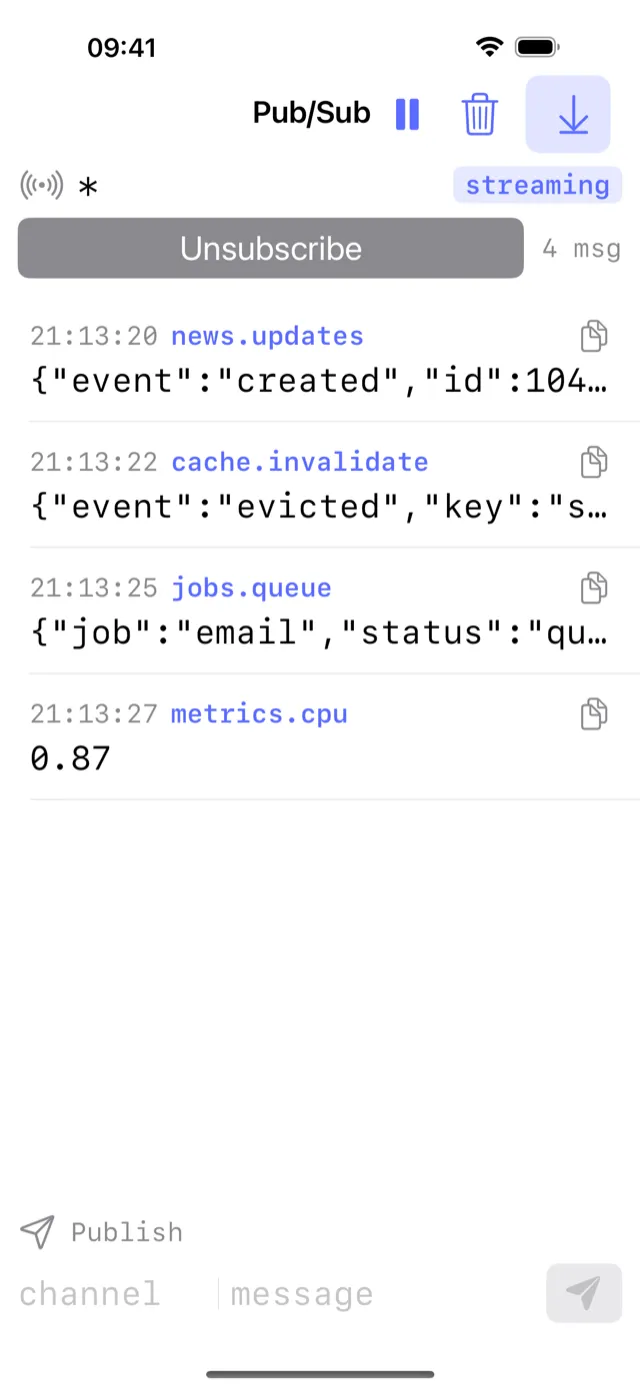
The Pub/Sub monitor in CacheDeck sends a SUBSCRIBE or PSUBSCRIBE command to your Redis server and keeps the connection open, displaying each incoming message as it arrives. Messages are shown with:
- Channel name: the exact channel the message was published to
- Payload: the full message body (JSON, plain text, binary-safe)
- Timestamp: when CacheDeck received it
Pattern subscriptions using PSUBSCRIBE let you watch multiple channels at once. For example, orders:* shows messages on orders:new, orders:updated, orders:cancelled, and any other channel matching the pattern.
The monitor stays open for as long as the app is in the foreground. If your iPhone screen locks, the subscription pauses and resumes when you return to the app.
Setting up Pub/Sub monitoring in CacheDeck
-
Connect to your Redis server. Open CacheDeck and connect to the server whose Pub/Sub traffic you want to monitor. SSH tunnel and TLS are both supported.
-
Open the Pub/Sub monitor. From the connection view, tap Pub/Sub Monitor.
-
Subscribe to a channel or pattern. Enter the channel name you want to monitor, or a pattern:
orders:new: a single channelorders:*: all channels starting withorders:*: every channel on the server (use carefully on busy systems)
-
Watch messages. Messages appear as they arrive. Each row shows the channel, payload, and receive time.
-
Test with a publish. To send a test message and verify your subscriber is working, switch to the CLI console tab and run:
PUBLISH orders:new '{"id": 1234, "status": "pending"}'The message should appear immediately in the Pub/Sub monitor.
Pub/Sub debugging on call: common scenarios
“Our notification worker is not receiving events”
Open the Pub/Sub monitor and subscribe to the channel the worker should be listening on. Then trigger an event from the application side. If the message appears in CacheDeck’s monitor, Redis is publishing correctly; the bug is in the subscriber. If no message appears, the publisher is not sending to the expected channel name (check for typos, environment-specific prefixes, or serialization issues).
“We’re getting duplicate messages”
Subscribe to the channel and watch message frequency. If messages appear multiple times per event, check for multiple publishers or a publisher that retries on network errors without deduplication.
“Our cache invalidation is not propagating”
Subscribe to the channel your application uses for cache-bust signals. Trigger an update that should invalidate the cache. If the signal appears in the Pub/Sub monitor, the invalidation message is being published; the consumer is not receiving or acting on it. If nothing appears, the publisher code path is not being reached.
“How much traffic is flowing through this channel?”
Subscribe with a pattern and count the message rate manually for 60 seconds. Pub/Sub in Redis has no built-in backpressure: if your channel is receiving thousands of messages per second, a slow subscriber will fall behind without any error signal.
Pub/Sub vs Redis Streams: which to monitor?
Redis Streams (XREAD, XREADGROUP) are persistent message logs; messages survive subscriber disconnections and can be replayed. If your system uses Streams rather than Pub/Sub, use CacheDeck’s CLI console to run XREAD or XREVRANGE commands to inspect stream entries.
The Pub/Sub monitor in CacheDeck is specifically for the classic SUBSCRIBE/PUBLISH pattern: fire-and-forget channel messages.
Supported server types
CacheDeck’s Pub/Sub monitor works with any RESP-compatible server that implements SUBSCRIBE, PSUBSCRIBE, and PUBLISH: Redis 6+, Valkey, and KeyDB.
CacheDeck includes Pub/Sub monitoring alongside a key browser, SSH tunnels, TLS/mTLS, CLI console, and write protection, all in a native iOS app for DevOps engineers and SREs. Free to download, one-time $4.99 Pro unlock, iOS 17+.
Related: How to connect to Redis from your iPhone · Inspect Redis keys on iPhone · KeyDB on iPhone · Redis client for iPhone: full feature overview